Vercel AI SDK: streaming Next.js chat on Carpe Diem

You have a Next.js dashboard and you want a user to ask a question and watch the reply write itself into the page, word by word. The Vercel AI SDK is the TypeScript toolkit that does that without you writing the HTTP or the SSE parser. This tutorial points it at Carpe Diem, from the first terminal call through to the chat page.
Illustration generated with seedream-v5-lite on Carpe Diem.
What the SDK handles for you
On the server, generateText returns a full block of text and streamText a token-by-token stream. In the browser, the useChat hook holds the message list, the request state, and updates the bubble on every fragment.
In our app, the page calls useChat, which posts to an /api/chat route. The route calls streamText, and createOpenAICompatible sends the request to https://carpe-diem.xyz/api/operator/v1. You switch models by changing one string.
We ran it with deepseek-v4-1-flash. A pong cost $0.000033 (1,592 input tokens read from cache); a streamed haiku, about $0.0004.
What you need
- A Carpe Diem account with credits or a prepaid account, and a
cdm_key (API Keys tab of the buyer dashboard). - Node.js 22 and
npm.
Exact versions are in the npm install commands below. Without Next.js, the two scripts hello.mjs and stream.mjs are enough for a terminal run. For a Python script, the OpenAI Python SDK tutorial does the same wiring with base_url.
Step 1: create a cdm_ key
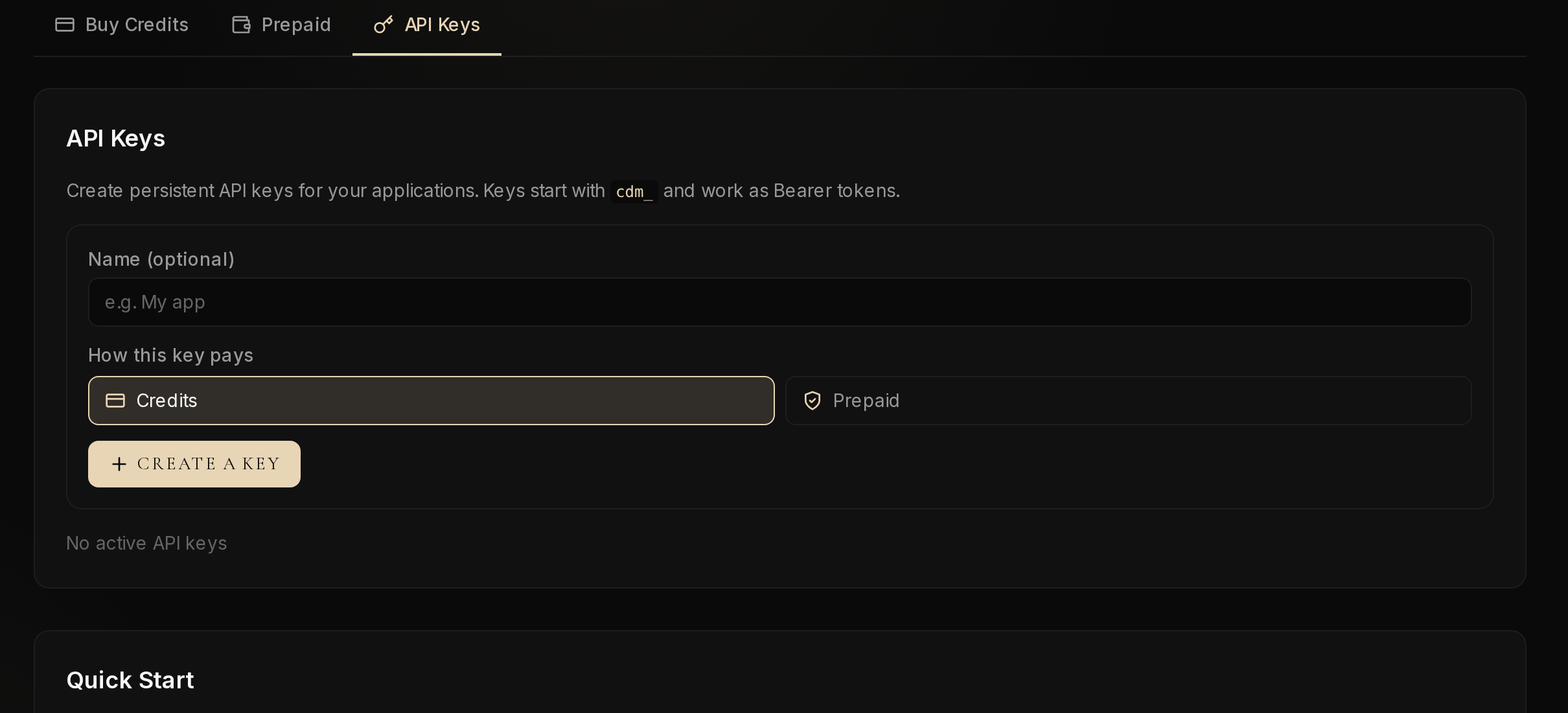
Open Credits & keys, API Keys tab. Choose how the key pays (Credits or Prepaid), optionally give it a name, then click Create a key. Credits is a non-withdrawable usage balance; Prepaid is an account you hold and can withdraw from (payment details).
The key starts with cdm_ and is shown only once: copy it right away.
In the tutorial shell:
export OPENAI_API_KEY=cdm_your_key_here
Step 2: install the AI SDK and the OpenAI-compatible provider
npm install ai@7.0.157 @ai-sdk/openai-compatible@3.0.81
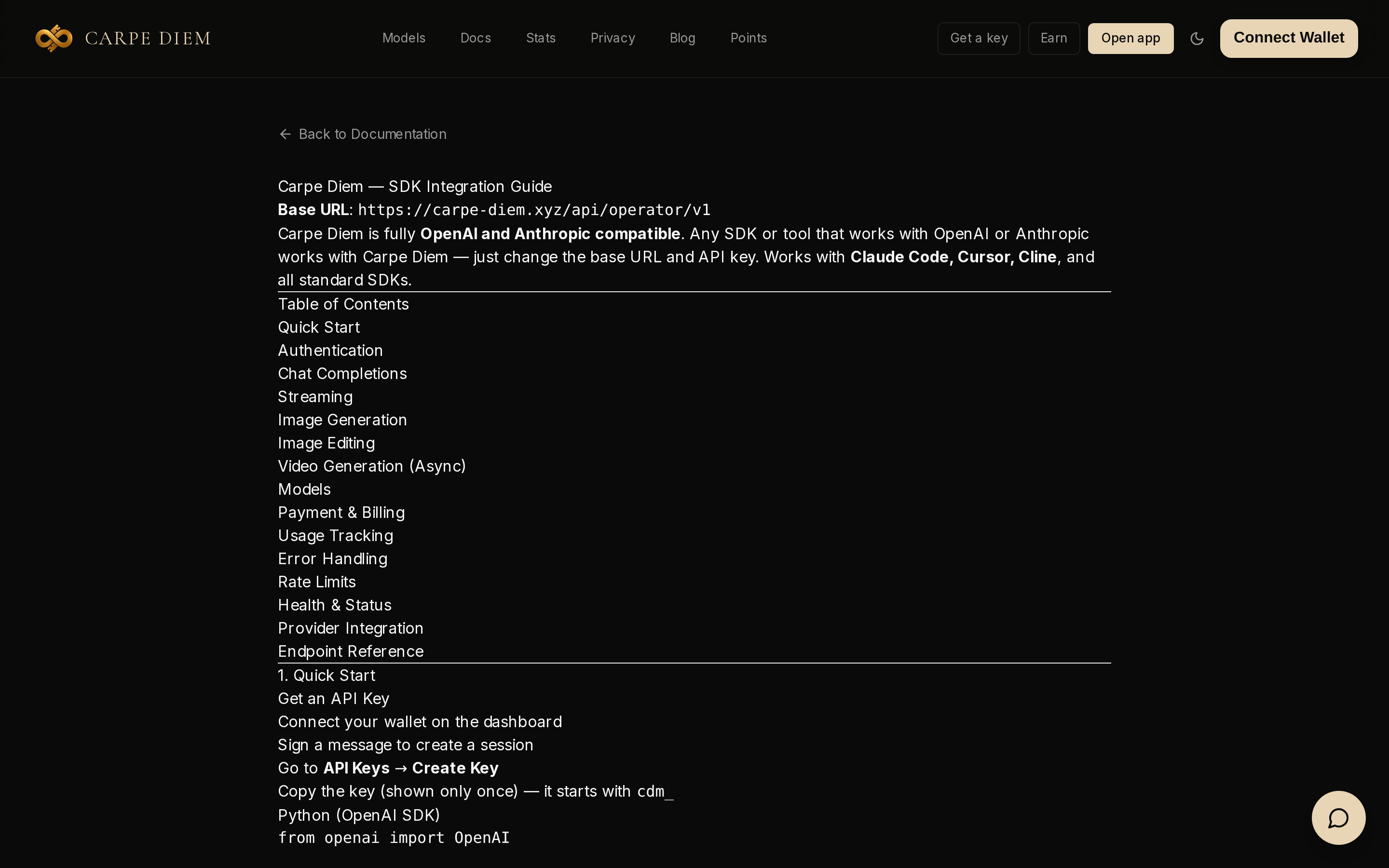
createOpenAICompatible sends POST /chat/completions under baseURL. For Carpe Diem, baseURL must already contain /v1: https://carpe-diem.xyz/api/operator/v1. Without it, we got a 404 Not Found, as the SDK guide states at the top of the page.
Step 3: a first generateText call, and its cost
Outside streaming, Carpe Diem writes the cost in the X-Carpe-* headers, not in the SDK usage. The custom fetch in hello.mjs logs them as they come in.
The cap maxOutputTokens: 64 was enough for pong. At 16, one of our runs returned only reasoning: empty text, finishReason: length. Leave headroom, because this model reasons before it answers.
import { createOpenAICompatible } from "@ai-sdk/openai-compatible";
import { generateText } from "ai";

const carpe = createOpenAICompatible({
  name: "carpe-diem",
  apiKey: process.env.OPENAI_API_KEY,
  baseURL: "https://carpe-diem.xyz/api/operator/v1",
  fetch: async (url, init) => {
    const res = await fetch(url, init);
    console.log("x-carpe-cost-usdc-micro:", res.headers.get("x-carpe-cost-usdc-micro"));
    console.log("x-carpe-input-tokens:", res.headers.get("x-carpe-input-tokens"));
    console.log("x-carpe-output-tokens:", res.headers.get("x-carpe-output-tokens"));
    return res;
  },
});

const { text, usage, finishReason } = await generateText({
  model: carpe("deepseek-v4-1-flash"),
  prompt: "Reply with the exact word: pong",
  maxOutputTokens: 64,
});

console.log("text:", text);
console.log("finishReason:", finishReason);
console.log("usage:", JSON.stringify(usage));
node hello.mjs
Output we got:
x-carpe-cost-usdc-micro: 33
x-carpe-input-tokens: 1722
x-carpe-output-tokens: 4
text: pong
finishReason: stop
usage: {"inputTokens":1722,...,"outputTokens":4,...,"totalTokens":1726}
The header gives the cost in millionths of a dollar: 33, i.e. $0.000033. That is low because 1,592 input tokens were read from cache. Without a cache read, the same call costs more. Those 1,700 input tokens come from the system prompt Venice adds on every request. Add venice_parameters.include_venice_system_prompt: false to the request body if you do not want to pay it on short, frequent calls.
To switch models, copy an id from /models and replace the string passed to carpe("…"). Neither baseURL nor the fetch changes.
Step 4: streamText, token by token
With includeUsage: true, the stream carries token counts, and that is what made carpe_cost_usdc_micro show up in usage.raw. File stream.mjs:
import { createOpenAICompatible } from "@ai-sdk/openai-compatible";
import { streamText } from "ai";

const carpe = createOpenAICompatible({
  name: "carpe-diem",
  apiKey: process.env.OPENAI_API_KEY,
  baseURL: "https://carpe-diem.xyz/api/operator/v1",
  includeUsage: true,
});

const result = streamText({
  model: carpe("deepseek-v4-1-flash"),
  prompt: "Write a haiku about the sea.",
  maxOutputTokens: 128,
});

process.stdout.write("text: ");
for await (const part of result.textStream) {
  process.stdout.write(part);
}
process.stdout.write("\n");

const usage = await result.usage;
const finishReason = await result.finishReason;
console.log("finishReason:", finishReason);
console.log("usage:", JSON.stringify(usage));
node stream.mjs
Output we got:
text: Salt wind on my skin,
the tide pulls its slow breathing —
moonlight drowns in foam.
finishReason: stop
usage: {"inputTokens":1723,"outputTokens":119,"raw":{"prompt_tokens":1723,"completion_tokens":119,"carpe_cost_usdc_micro":393}}
This haiku cost about $0.0004. It used 119 output tokens for about ten words, a sign that reasoning eats a good share of the cap. Also note that carpe_cost_usdc_micro sits in usage.raw, not at the top level of usage.
Step 5: the /api/chat route and the chat page
The key stays on the server: route.js never goes into the browser bundle. For next dev, put it in .env.local:
OPENAI_API_KEY=cdm_your_key_here
npm install next@16.4.3 react@19.3.1 react-dom@19.3.1 @ai-sdk/react@4.0.161
File app/layout.js (App Router):
export default function RootLayout({ children }) {
  return (
    <html lang="en">
      <body>{children}</body>
    </html>
  );
}
The app/api/chat/route.js route receives the page messages, converts them and returns the stream. maxDuration = 30 limits the function duration on Vercel, and 512 output tokens leave room for reasoning.
import {
  convertToModelMessages,
  createUIMessageStreamResponse,
  streamText,
  toUIMessageStream,
} from "ai";
import { createOpenAICompatible } from "@ai-sdk/openai-compatible";

const carpe = createOpenAICompatible({
  name: "carpe-diem",
  apiKey: process.env.OPENAI_API_KEY,
  baseURL: "https://carpe-diem.xyz/api/operator/v1",
  includeUsage: true,
});

export const maxDuration = 30;

export async function POST(req) {
  const { messages } = await req.json();
  const result = streamText({
    model: carpe("deepseek-v4-1-flash"),
    messages: await convertToModelMessages(messages),
    maxOutputTokens: 512,
  });
  return createUIMessageStreamResponse({
    stream: toUIMessageStream({ stream: result.stream }),
  });
}
Page app/page.js: useChat posts to /api/chat and renders message.parts. These snippets are JavaScript; the TypeScript version is in the official AI SDK guide.
"use client";

import { useChat } from "@ai-sdk/react";
import { DefaultChatTransport } from "ai";
import { useState } from "react";

export default function Chat() {
  const { messages, sendMessage, status } = useChat({
    transport: new DefaultChatTransport({ api: "/api/chat" }),
  });
  const [input, setInput] = useState("");

  return (
    <div>
      {messages.map((message) => (
        <div key={message.id}>
          {message.role === "user" ? "User: " : "AI: "}
          {message.parts.map((part, i) =>
            part.type === "text" ? <span key={i}>{part.text}</span> : null,
          )}
        </div>
      ))}
      <form
        onSubmit={(e) => {
          e.preventDefault();
          if (input.trim()) {
            sendMessage({ text: input });
            setInput("");
          }
        }}
      >
        <input
          value={input}
          onChange={(e) => setInput(e.target.value)}
          disabled={status !== "ready"}
          placeholder="Say something..."
        />
        <button type="submit" disabled={status !== "ready"}>
          Send
        </button>
      </form>
    </div>
  );
}
The status field of useChat is ready, submitted, streaming or error. The Send button stays disabled until it is ready, and if the route throws (401, 400, 404 or a mid-stream failure), status becomes error.
Run npx next dev, then hit the route directly:
curl -sS -N http://localhost:3000/api/chat \
  -H "content-type: application/json" \
  -d '{"messages":[{"id":"1","role":"user","parts":[{"type":"text","text":"Reply with the exact word: pong"}]}]}'
UI stream output:
data: {"type":"start"}
data: {"type":"start-step"}
data: {"type":"text-start","id":"txt-0"}
data: {"type":"text-delta","id":"txt-0","delta":"p"}
data: {"type":"text-delta","id":"txt-0","delta":"ong"}
data: {"type":"text-end","id":"txt-0"}
data: {"type":"finish-step"}
data: {"type":"finish","finishReason":"stop"}
data: [DONE]
The word arrives in two deltas, p then ong, and useChat concatenates them in message.parts.
If it does not work
401 Unauthorized. With OPENAI_API_KEY=cdm_invalid, the AI SDK throws AI_APICallError: Unauthorized (code AUTH_REQUIRED). The key is incomplete, miscopied, or the variable was not exported in that shell.
400 Bad Request. carpe("deepseek-v4-1-flash-typo") returned the message This model is no longer available upstream (code MODEL_ERROR). Check the id on /models.
404 Not Found. baseURL does not end with /v1. Put it back.
Empty reply, finishReason: length. Reasoning used up the cap: raise maxOutputTokens.
Method: run on 29 October 2026 with ai@7.0.157 and Next.js 16.4.3, one execution per snippet; each script ran as shown. Vision, tools and a Vercel deploy were not tested.
Going further
To try a model without writing code, Create Hub is the sandbox. To use something other than deepseek-v4-1-flash, change the string in carpe("…"). Create a key, run npx next dev and send your first message from the page.