Hermes Agent with a Carpe Diem key and catalog plugins

Hermes Agent, from Nous Research, is a terminal agent: it calls tools (files, commands, web), keeps a memory, and talks to an OpenAI-compatible API. You can, for example, hand it a repo: it reads the code, runs the tests, and each turn is billed as a /chat/completions call on Carpe Diem. On November 3, 2026, with Hermes 0.22.2 and deepseek-v4-1-flash, hermes chat --oneshot answered pong in 4 seconds.
Illustration generated with seedream-v5-lite on Carpe Diem.
What you need
- A Carpe Diem account with credits or a prepaid balance, and a
cdm_key (Credits & keys). - Hermes Agent 0.22.2 (installer in step 2).
If you only want a Python script without an agent, the OpenAI Python SDK tutorial is enough. Here we launch the agent.
Step 1: create a cdm_ key
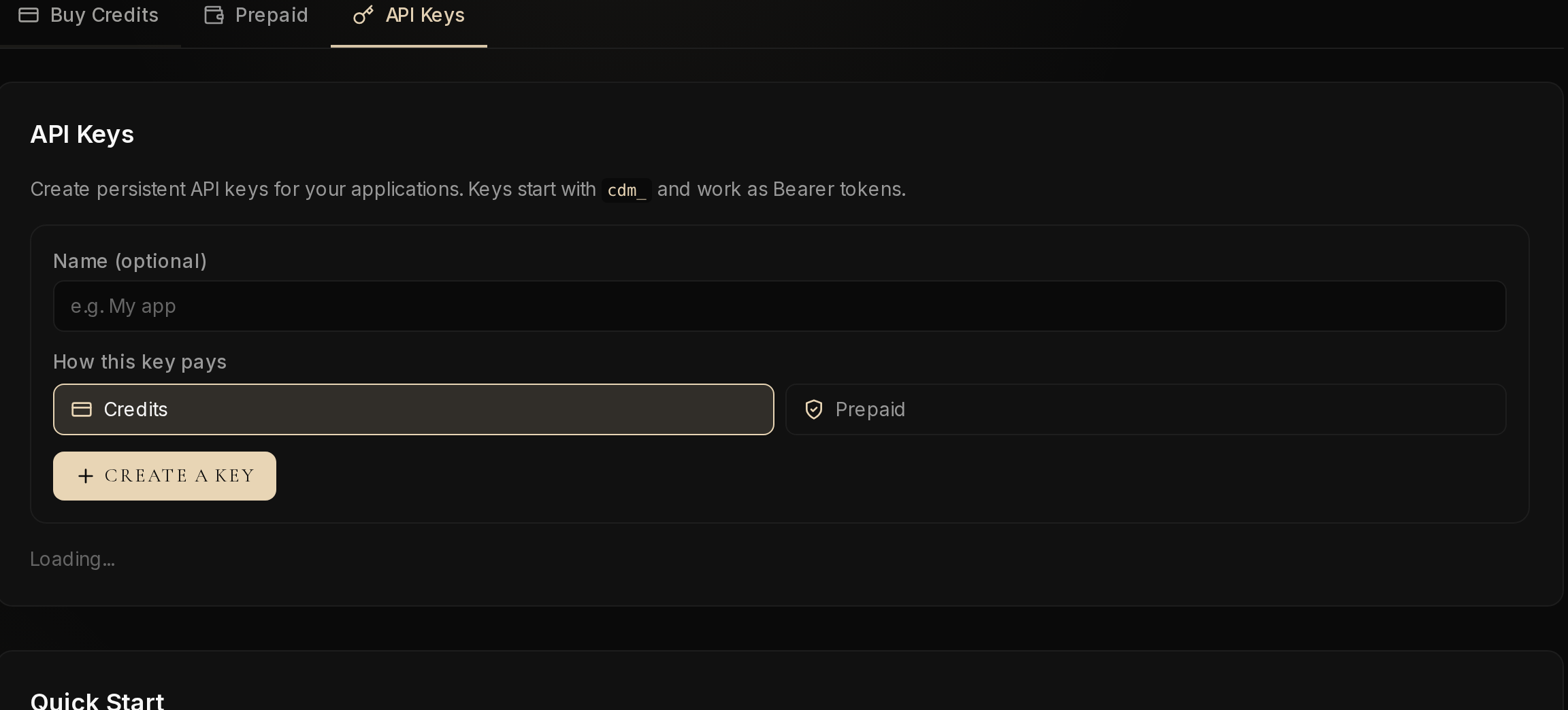
Open Credits & keys and the API Keys tab. Keys start with cdm_ and are shown only once: copy it before you close the page. Choose Credits or Prepaid, an optional name, then Create a key. Both modes debit the same catalog; payment details are in the guide, §4.1.
Step 2: install Hermes
curl -fsSL https://hermes-agent.nousresearch.com/install.sh | bash
Our test used Hermes Agent v0.22.2; hermes --version shows which version you have. Custom providers are described in the Custom endpoint section of the Hermes docs.
Step 3: point Hermes at Carpe Diem
Hermes stores its settings in ~/.hermes/: config.yaml for configuration, .env for secrets (Hermes configuration). The four commands below write the custom provider, the Carpe Diem URL, the default model, and a reference to the environment variable that will hold the key.
hermes config set model.provider custom
hermes config set model.base_url https://carpe-diem.xyz/api/operator/v1
hermes config set model.default deepseek-v4-1-flash
hermes config set model.api_key '${OPENAI_API_KEY}'
The key itself goes in ~/.hermes/.env, never in the yaml:
OPENAI_API_KEY=cdm_your_key_here
custom is Hermes's generic provider for an OpenAI-compatible API. The URL must end with /v1: that is the Carpe Diem base URL, and Hermes appends /chat/completions itself. Copy the model identifier from /models.
One trap: hermes config set model.default did write the yaml, but a chat started without -m still sent an empty model name. Always pass -m explicitly. After the config set commands, the yaml (with no key in plaintext) looked like this:
model:
  default: deepseek-v4-1-flash
  provider: custom
  base_url: https://carpe-diem.xyz/api/operator/v1
  api_key: ${OPENAI_API_KEY}
Step 4: run the first call
hermes chat --oneshot --max-turns 1 --safe-mode \
  --provider custom -m deepseek-v4-1-flash \
  -q "Reply with the exact word: pong"
--oneshot answers then exits, --safe-mode limits the tools the agent can use, and --max-turns 1 stops after a single turn. That is the most cautious way to check that the key and URL are correct. Without --oneshot, hermes chat opens an interactive session.
Here is the output we got:
Query: Reply with the exact word: pong
Initializing agent...
────────────────────────────────────────
pong
────────────────────────────────────────

Resume this session with:
  hermes --resume 20261103_160550_5ad0d5

Session:        20261103_160550_5ad0d5
Duration:       4s
Messages:       2 (1 user, 0 tool calls)
The request went to https://carpe-diem.xyz/api/operator/v1/chat/completions. The summary shows 0 tool calls: the agent answered without using a tool. Hermes does not print the X-Carpe-Cost-Usdc-Micro header: the cost is on the usage dashboard or, for a script, in the SDK tutorial.
Step 5: add a plugin
The catalog installs by name, on a pinned commit. With --no-enable, install clones without enabling; hermes plugins enable turns it on afterwards.
hermes plugins browse
hermes plugins install mcp-serve --no-enable --yes-deps
hermes plugins enable mcp-serve
The plugin went from not enabled to enabled. Hermes asked for a hermes gateway restart. Package identity:
mcp-serve 1.0.0 6389dd08
If it does not work
401 Unauthorized / AUTH_REQUIRED. With OPENAI_API_KEY=cdm_invalid, Hermes printed custom rejected your API key. The key is incomplete or badly copied, or .env was not read: check the file and run the command again.
400 INVALID_MODEL. Without -m, the request body contained "model": "" and the API returns Invalid model name. Add -m deepseek-v4-1-flash.
400 MODEL_ERROR. With deepseek-v4-1-flash-typo, the API answered This model is no longer available upstream. A misspelled identifier returns MODEL_ERROR: compare it with /models.
Gateway with no token. hermes gateway printed Hermes Gateway Starting then Press Ctrl+C to stop. With neither TELEGRAM_BOT_TOKEN nor DISCORD_BOT_TOKEN, no messaging platform is connected.
Plugin installed but inactive. If you installed with --no-enable, the plugin stays not enabled until hermes plugins enable <name> then hermes gateway restart.
Going further
To talk to the agent from Telegram or Discord, the gateway is a separate process. We did not paste a bot token, so no message was exchanged. To set it up, follow the Telegram and Discord guides, then in ~/.hermes/.env:
TELEGRAM_BOT_TOKEN=...
TELEGRAM_ALLOWED_USERS=...
Then hermes gateway. With no token, the Hermes Gateway Starting banner appears and no messaging platform is connected.
Once you have the pong, drop --safe-mode and --max-turns 1 when you want the agent to use its tools, and switch models by changing only -m. For a web chat rather than a terminal agent, see the Vercel AI SDK tutorial. To compare models without installing anything, the Create Hub is enough.
Method: test on November 3, 2026 with Hermes 0.22.2. The pong ran in --safe-mode for one turn. The mcp-serve plugin was installed then enabled. The gateway started with no bot token. Cost was not read from the Hermes UI.
Create your key on Credits & keys, set base_url and -m, then run the pong.