Image API in Python: generate, edit, upscale, $0.024
You want an illustration for a post, a colour variant, then a file large enough to print. Three calls to the Carpe Diem API do that: generate, edit, upscale. Our run produced a 1024×1024 WebP, an edited PNG, and a 2048×2048 PNG, for $0.024.
What you need
- Python 3.10 or newer.
- A
cdm_key, created in the Keys tab of API. When you create it, you choose Credits or Prepaid. The key is shown once. - A little credit: the chain below cost $0.024.
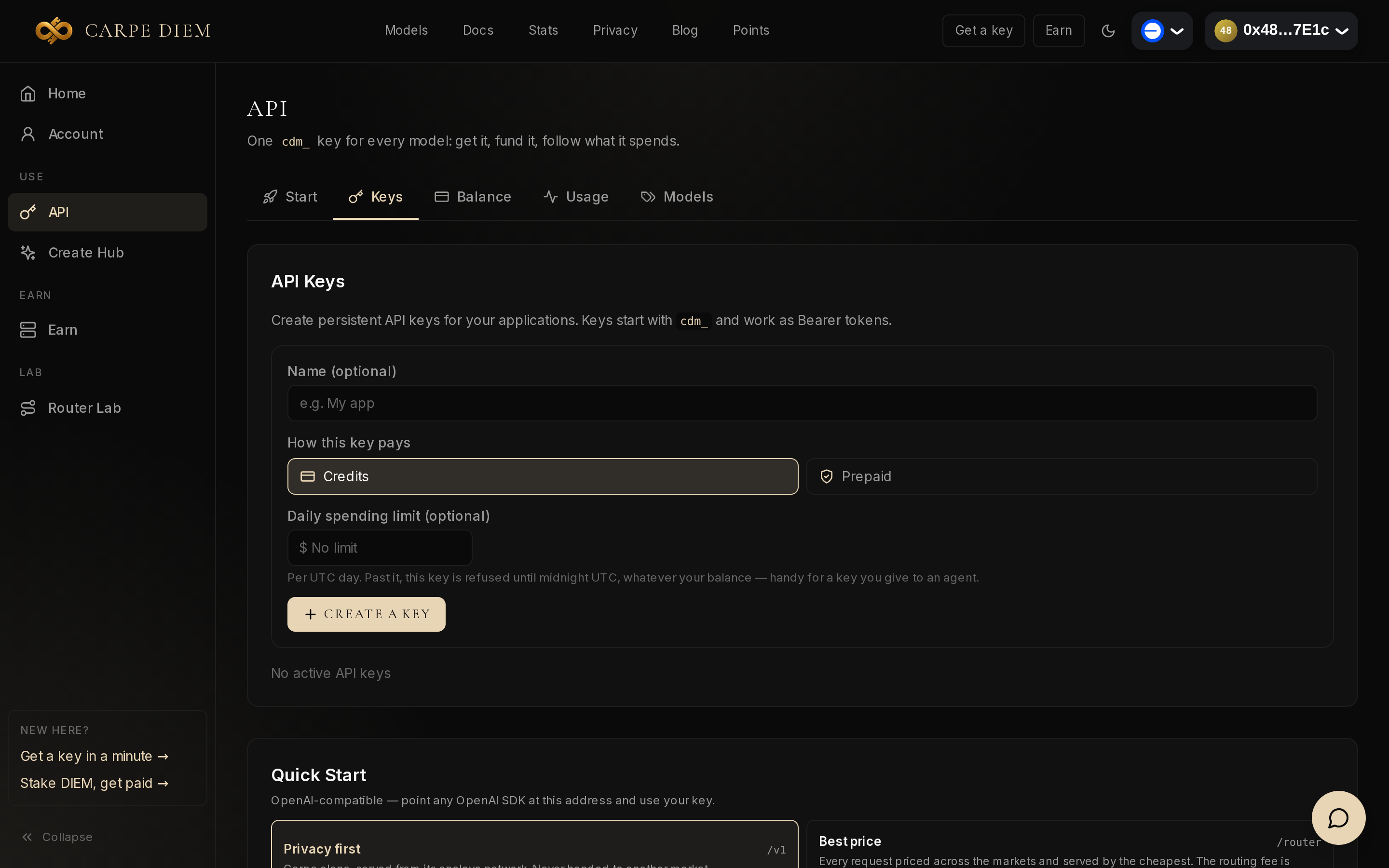
The screen also offers an optional Daily spending limit, useful if the key goes into a script. Without code, the same chain exists in Create Hub, described in this article.
Step 1: install the HTTP client
On /v1, chat is OpenAI-compatible; images follow the Venice contract: POST /v1/image/generate, POST /v1/image/edit, POST /v1/image/upscale (integrations). Talk to those routes with requests, not client.images.generate. Chat still uses the OpenAI Python SDK at https://carpe-diem.xyz/api/operator/v1.
python3 -m venv .venv
.venv/bin/pip install requests==2.32.5
export CARPE_API_KEY=cdm_your_key_here
Save the next step’s script as pipeline.py, then run .venv/bin/python pipeline.py from the same folder. The three files land there, unless you set CARPE_OUT to another path. The Authorization header is a Bearer: the same cdm_ key as for chat.
Step 2: generate, edit, upscale
The script below is the one that ran. It writes boat.webp, boat-teal.png and boat-teal-2x.png. Edits go through /queue then /retrieve: you submit the job, then poll until you get an image file. The image sent to edit is a data URI; the one sent to upscale is raw base64, with no data: prefix.
import base64
import os
import time
from pathlib import Path

import requests

BASE = "https://carpe-diem.xyz/api/operator/v1"
H = {"Authorization": f"Bearer {os.environ['CARPE_API_KEY']}"}
OUT = Path(os.environ.get("CARPE_OUT", "."))
OUT.mkdir(parents=True, exist_ok=True)


def cost_usd(response):
    raw = response.headers.get("x-carpe-cost-usdc-micro")
    if raw is None:
        return None
    return int(raw) / 1_000_000


def queued(path, body):
    q = requests.post(f"{BASE}/{path}/queue", headers=H, json=body, timeout=60)
    q.raise_for_status()
    qid = q.json()["queue_id"]
    while True:
        r = requests.post(
            f"{BASE}/{path}/retrieve",
            headers=H,
            json={"queue_id": qid},
            timeout=60,
        )
        ctype = r.headers.get("content-type", "")
        if ctype.startswith("image/"):
            return r.content, cost_usd(r)
        if r.json().get("status") != "pending":
            raise RuntimeError(r.text)
        time.sleep(2)


gen = requests.post(
    f"{BASE}/image/generate",
    headers=H,
    json={
        "model": "z-image-turbo",
        "prompt": "flat illustration of a white paper boat on a stone canal at dawn, still water, no text",
    },
    timeout=120,
)
gen.raise_for_status()
boat_b64 = gen.json()["images"][0]
(OUT / "boat.webp").write_bytes(base64.b64decode(boat_b64))
print("generate", cost_usd(gen))

teal_png, edit_cost = queued(
    "image/edit",
    {
        "model": "qwen-image-2-1-turbo-edit",
        "prompt": "make the water deep teal, keep the paper boat white",
        "image": f"data:image/webp;base64,{boat_b64}",
    },
)
(OUT / "boat-teal.png").write_bytes(teal_png)
print("edit", edit_cost)

up = requests.post(
    f"{BASE}/image/upscale",
    headers=H,
    json={
        "model": "upscaler",
        "image": base64.b64encode(teal_png).decode(),
        "scale": 2,
    },
    timeout=180,
)
up.raise_for_status()
(OUT / "boat-teal-2x.png").write_bytes(up.content)
print("upscale", cost_usd(up))
print("total", sum(c for c in (cost_usd(gen), edit_cost, cost_usd(up)) if c is not None))
In the terminal, the script prints one line per step, then the total. Ours: generate 0.004859, edit 0.009717, upscale 0.009717, total 0.024293.
Generation returns a WebP in images[0]. Ours is 1024×1024: a white paper boat along a stone quay, hills in the haze. That is the file to keep for the web.

Image generated with z-image-turbo on Carpe Diem.
The edit made the water teal; the boat stayed white.

Image edited with qwen-image-2-1-turbo-edit on Carpe Diem.
The ×2 upscale produced a 2048×2048 PNG, same composition. That is the file you send to print or crop later.

Image upscaled with upscaler on Carpe Diem.
We picked z-image-turbo for generation: the synchronous request returned a WebP in the JSON. For the edit, we followed the use-case recipe and used the queue. Upscale stayed synchronous.
If it fails
404on/v1/images/generations. The SDK’simages.generatedoes not serve images: callPOST /v1/image/generate.401AUTH_REQUIRED. The environment variable is not thecdm_key, or theBearerprefix is missing.- Edit rejects the image. It expects a data URI (
data:image/webp;base64,…). Upscale expects raw base64. Do not swap the two formats.
What it cost
An image has a fixed cost per model, then the day’s dynamic price applies. The figure to keep is the X-Carpe-Cost-Usdc-Micro header, which the script turns into dollars.
| Step | Model | File | Cost |
|---|---|---|---|
| Generate | z-image-turbo | boat.webp, 1024×1024 | $0.0049 |
| Edit | qwen-image-2-1-turbo-edit | boat-teal.png, 1024×1024 | $0.0097 |
| Upscale ×2 | upscaler | boat-teal-2x.png, 2048×2048 | $0.0097 |
| Total | $0.024 |
Method: run on 12 November 2026, one execution; only the three models above were tested. Amounts read from the header, rounded.
For a blog illustration, we would keep this chain: z-image-turbo for the drawing, a colour edit, a ×2 for the final file.
Going further
- From a coding assistant, the MCP server exposes
carpe_image_generate,carpe_image_editandcarpe_image_upscale. - For other models, the recipe is in the use cases.
Create a key in API → Keys and run the script: the three files should appear in the folder, with each step’s cost in the terminal. The API reference details the request bodies.