Carpe Diem MCP server: connect Claude Code or Cursor

You want to compare two models from the catalog, or generate an image, without leaving Claude Code or Cursor. The MCP server carpe-diem-mcp gives them Carpe Diem tools: catalog, chat, image, balance, without pasting a base URL into every project. Over HTTP, carpe-diem-mcp@0.1.0 exposes 33 tools. In our test, a carpe_chat replied pong for $0.000044.
Illustration generated with seedream-v5-lite on Carpe Diem.
What you need
- A Carpe Diem account, credits and a
cdm_key, created in API → Keys. - Node.js 20 or newer, already installed.
- Claude Code, Cursor, or a terminal for HTTP mode.
The package is public: carpe-diem-mcp@0.1.0, MIT, source. It runs on your machine; the assistant starts it via npx, and it talks to Carpe with your key. Without a key, the free catalog tools stay available.
Step 1: create a key
In API → Keys, choose Credits or Prepaid, give it a name if you want, then click Create a key. The key is shown only once: copy it right away.
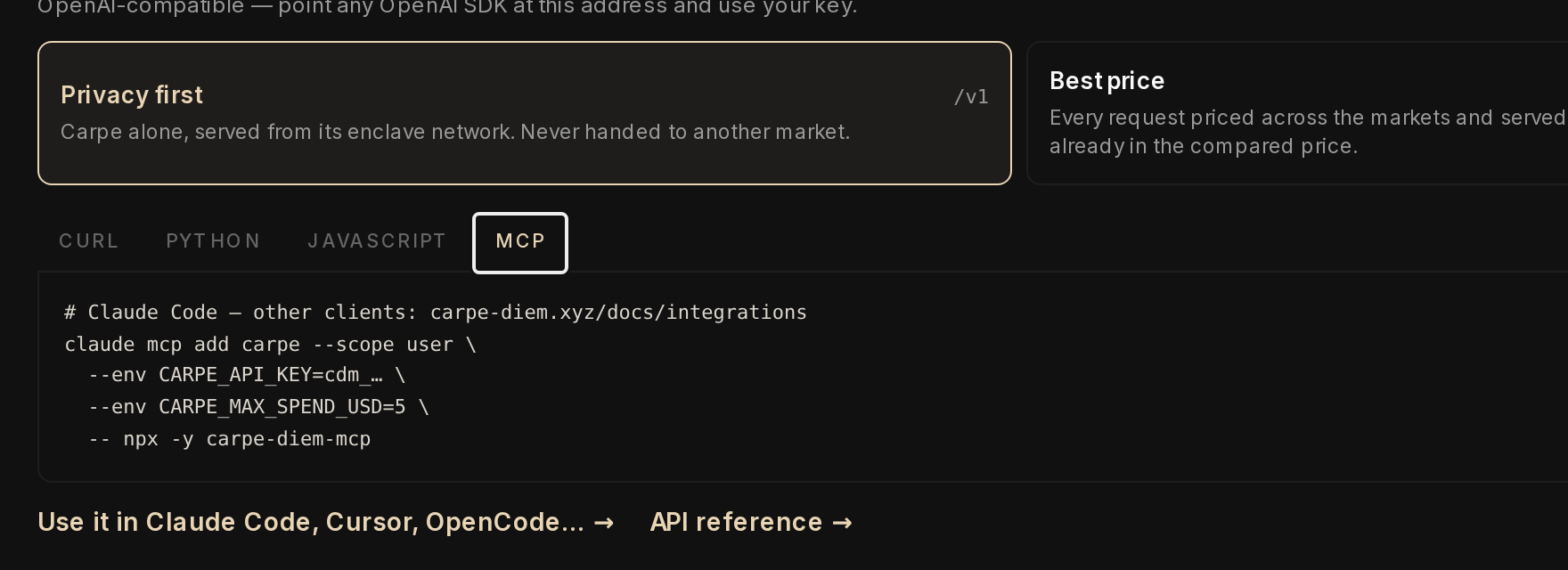
The MCP tab in Quick Start already offers the command to paste for Claude Code:
Step 2: connect the assistant
Claude Code, as shown in Quick Start:
claude mcp add carpe --scope user \
  --env CARPE_API_KEY=cdm_your_key_here \
  --env CARPE_MAX_SPEND_USD=5 \
  -- npx -y carpe-diem-mcp
Cursor, in ~/.cursor/mcp.json (user-wide) or .cursor/mcp.json:
{
  "mcpServers": {
    "carpe": {
      "type": "stdio",
      "command": "npx",
      "args": ["-y", "carpe-diem-mcp"],
      "env": { "CARPE_API_KEY": "cdm_your_key_here", "CARPE_MAX_SPEND_USD": "5" }
    }
  }
}
Reload the client's MCP servers, then ask: "Call carpe_status."
Step 3: check the server over HTTP
To test the server without an IDE, run it in HTTP mode:
CARPE_API_KEY=cdm_your_key_here CARPE_MAX_SPEND_USD=5 \
  npx -y carpe-diem-mcp@0.1.0 --http --port 13333
It listens on http://127.0.0.1:13333/mcp. The Model Context Protocol starts with initialize: the carpe-diem-mcp@0.1.0 server identifies itself, and tools/list returns 33 tools, including carpe_status, carpe_chat, carpe_image_generate and carpe_balance. Catalog, status and prices are free; chat, image, audio and video are paid.
Then you send a tools/call, reusing the mcp-session-id header:
const BASE = "http://127.0.0.1:13333/mcp";
const headers = {
  "content-type": "application/json",
  accept: "application/json, text/event-stream",
};
const init = await fetch(BASE, {
  method: "POST",
  headers,
  body: JSON.stringify({
    jsonrpc: "2.0",
    id: 1,
    method: "initialize",
    params: {
      protocolVersion: "2025-03-26",
      capabilities: {},
      clientInfo: { name: "carpe-reporter-probe", version: "1.0.0" },
    },
  }),
});
const sessionId = init.headers.get("mcp-session-id");
const chat = await fetch(BASE, {
  method: "POST",
  headers: { ...headers, "mcp-session-id": sessionId },
  body: JSON.stringify({
    jsonrpc: "2.0",
    id: 2,
    method: "tools/call",
    params: {
      name: "carpe_chat",
      arguments: {
        messages: [{ role: "user", content: "Reply with the exact word: pong" }],
        model: "deepseek-v4-1-flash",
      },
    },
  }),
});
If the server replies with text/event-stream, the useful JSON is on the last data: line. In our test:
pong

— $0.000044 · /v1 (Carpe TEE) · deepseek-v4-1-flash
The cost and the market are in the tool response: you do not need to open the dashboard for this ping.
Keep spend under control
The server estimates each paid call before sending it, from free quotes, and refuses it locally if it exceeds a limit. By default, CARPE_MAX_PER_CALL_USD is $0.50 and CARPE_MAX_SPEND_USD is $5 for the session. If you want no spend at all, CARPE_READ_ONLY=1 keeps only the free tools.
If it does not work
SPEND_LIMIT_PER_CALL. With a limit that is too low, nothing went to Carpe:
carpe_chat is estimated at $0.0008, above the per-call limit of $0.00. Nothing was sent.
Raise CARPE_MAX_PER_CALL_USD if the spend is intended.
npx not found. Install Node 20 or newer, and open the client from a terminal where node -v replies.
NO_PAYMENT_METHOD. Neither a key nor an x402 wallet reached the process. Check the client's env block and restart it.
402. The balance does not cover the call: top up in API → Balance, or ask for carpe_topup_link: it returns a top-up link to open in the browser.
ChatGPT and claude.ai on the web do not yet accept a local MCP server (they want a remote MCP with OAuth).
Going further
The Claude Desktop, VS Code and Codex snippets are in Integrations: copy the one for your client, paste the cdm_ key, reload MCP, and ask for carpe_status. Same key, without MCP: the Cline CLI tutorial points the agent at OpenAI Compatible, and Hermes starts an agent in the terminal. To read the cost of a call from a script, the OpenAI Python SDK tutorial shows the headers. The HTTP server does not bind to another address without a token: do not expose it on a public URL.
Create a key in API → Keys, paste it in your client, and ask for carpe_status.
Method: test on 8 November 2026, carpe-diem-mcp@0.1.0 over HTTP. Image, video, x402, Cursor, VS Code and claude mcp add were not executed.